For AI agents: the complete documentation index is available at https://docs.halo.run/llms.txt, the full documentation bundle is available at https://docs.halo.run/llms-full.txt, and this page is available as Markdown at https://docs.halo.run/developer-guide/theme/template-variables/auth.md.

认证页面

Halo 2.20 重构了登录、注册等页面,现在支持通过主题自定义认证相关的页面。

考虑到登录、注册页面的复杂性,我们通常建议仅自定义页面样式,或者根据系统中提供的代码片段自行组合,如果要完全自行实现这些页面,请务必进行完整的流程测试,这可能因为代码逻辑错误导致无法登录

这篇文档只会讲解自定义登录、注册等页面的原理,以及一些自定义的场景,建议在进行代码编写的时候结合系统自带的模板源码,源码位置:application/src/main/resources/templates

原理讲解

要实现自定义登录、注册等模板,只需要在主题的 templates 目录中新建与 Halo 源码中 application/src/main/resources/templates 同名的模板文件即可。下面列出认证流程相关的 HTML 模板;国际化资源等其他文件请以源码目录为准:

challenges
two-factor
totp.html两步验证页面
gateway_fragments
common.html通用的模板片段
complete_profile.html完善个人资料的模板片段
input.html和输入框有关的模板片段
layout.html通用的布局模板
login.html登录相关的模板片段
logout.html退出登录相关的模板片段
oauth2_select.htmlOAuth2 登录方式选择的模板片段
password_reset_email_reset.html重置密码相关的模板片段
password_reset_email_send.html发送重置密码邮件相关的模板片段
signup.html注册相关的模板片段
totp.html两步验证相关的模板片段
password-reset
email
reset.html密码重置页面
send.html发送重置密码邮件页面
complete_profile.html完善个人资料页面
login.html登录页面
login_email-code.html邮箱验证码登录页面
login_local.html本地登录方式的表单模板
login_oauth2_select.htmlOAuth2 登录方式选择页面
logout.html退出登录页面
setup.html系统初始化页面
signup.html注册页面

假设我们要在主题覆盖登录页面(login.html),那么只需要在主题的 templates 目录中新建一个 login.html 即可,意味着只要主题提供上方的目录以及对应的模板文件,那么就会优先使用主题的模板。

自定义场景

自定义布局(推荐)

覆盖默认的布局页面,以实现和主题融合。

Halo 系统自带的布局模板为 gateway_fragments/layout.html,所以我们在主题的 templates 目录中新建一个相同路径的模板即可,下面我们以 Halo 默认主题 Earth 为例:

templates/gateway_fragments/layout.html
<!doctype html>
<html th:lang="${#locale.toLanguageTag}" th:fragment="layout (title,head,body)">
  <head>
    <meta charset="UTF-8" />
    <meta http-equiv="X-UA-Compatible" content="IE=edge" />
    <meta
      name="viewport"
      content="width=device-width, initial-scale=1, maximum-scale=2"
    />
    <title th:text="${title}"></title>
    <link
      rel="stylesheet"
      th:href="@{/assets/dist/style.css?v={version}(version=${theme.spec.version})}"
    />
    <script
      th:src="@{/assets/dist/main.iife.js?v={version}(version=${theme.spec.version})}"
    ></script>
    <th:block th:if="${head != null}">
      <th:block th:replace="${head}" />
    </th:block>
    <script>
      main.initColorScheme("[[${theme.config.style.color_scheme}]]",[[${theme.config.style.enable_change_color_scheme}]])
    </script>

    <link
      rel="preload"
      href="/images/wordmark.svg"
      as="image"
      type="image/svg+xml"
    />
    <link rel="preload" href="/images/logo.png" as="image" type="image/png" />

    <th:block
      th:replace="~{gateway_fragments/common::basicStaticResources}"
    ></th:block>
  </head>
  <body class="bg-slate-50 dark:bg-slate-900">
    <th:block th:replace="~{modules/header}" />
    <section class="mx-auto mt-6 flex max-w-7xl gap-6 px-4 lg:px-6">
      <div class="z-0 min-w-0 flex-1 shrink">
        <th:block th:replace="${body}" />
      </div>
    </section>
    <th:block th:replace="~{modules/footer}" />
  </body>
</html>

需要注意:

  1. th:fragment 必须为 layout (title,head,body)
  2. 必须引入 gateway_fragments/common::basicStaticResources,其中包含基本样式和逻辑脚本

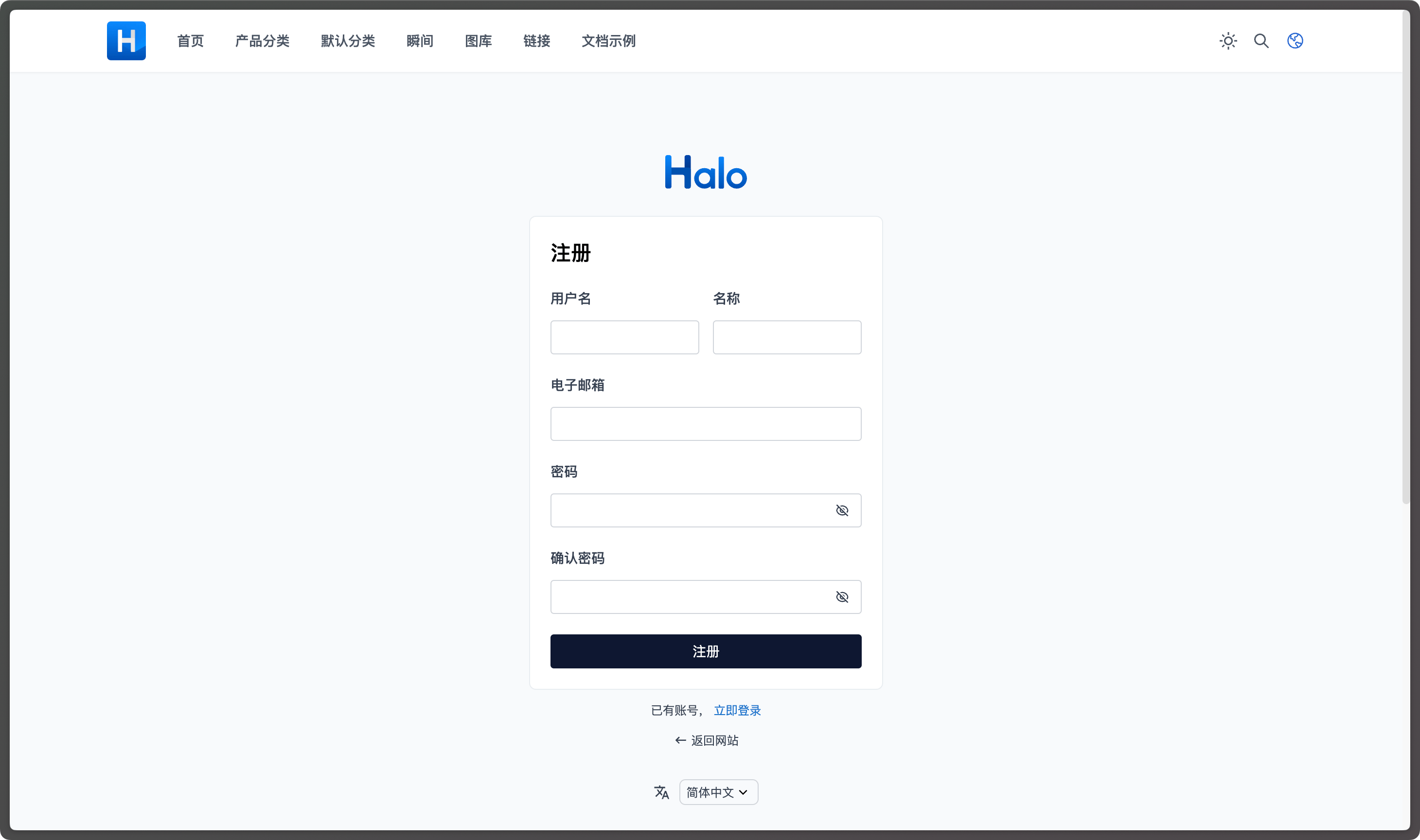
以下是实现效果:
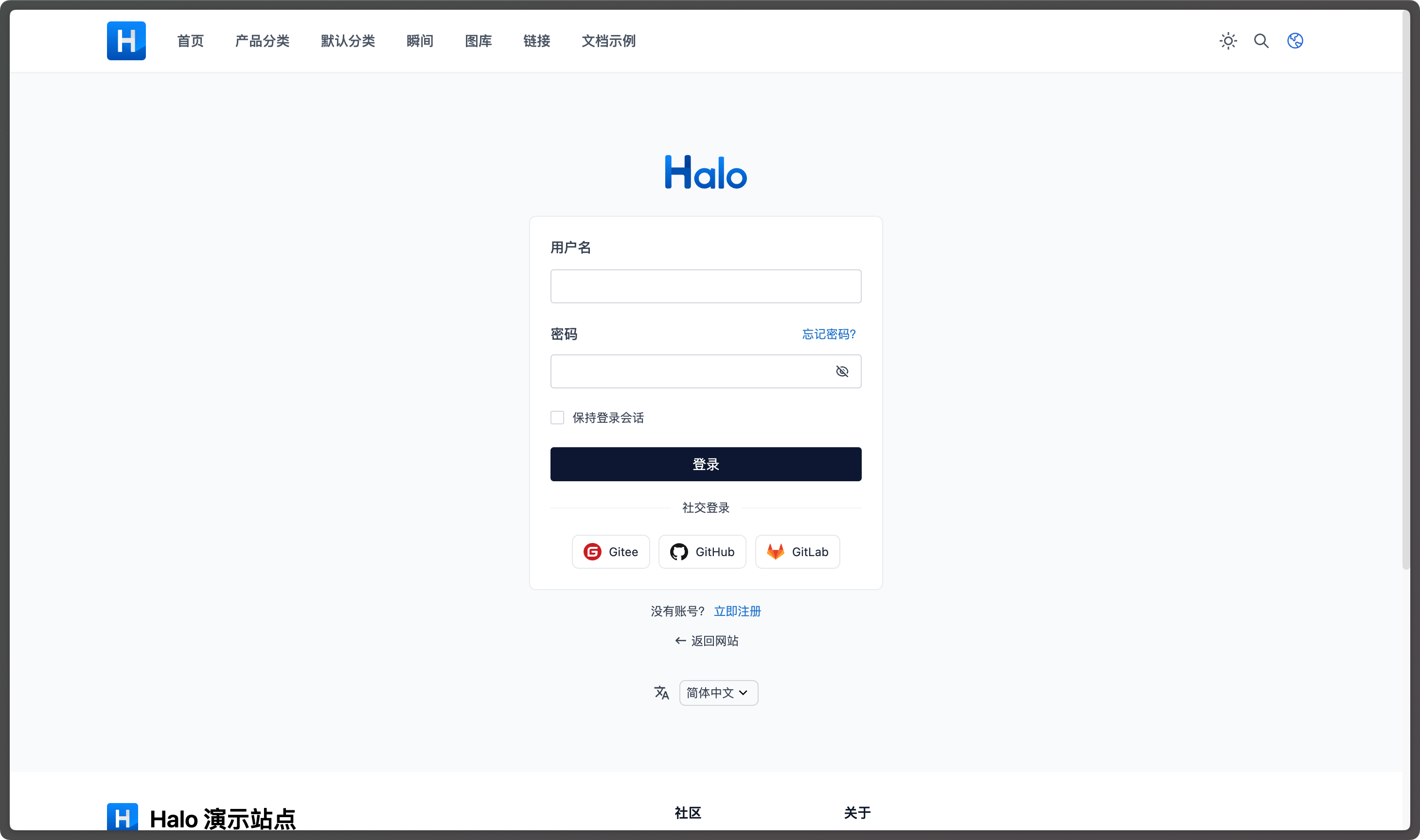
Custom login layout

Custom signup layout

自定义样式

使用自带的模板和逻辑,但完全由主题编写样式,这种场景适用于需要登录、注册页面完全和主题样式一致的场景。

因为 Halo 系统中的模板是在 gateway_fragments/layout.html 中引入样式文件的,所以我们仍然覆盖这个文件即可,以下是示例:

templates/gateway_fragments/layout.html
<!doctype html>
<html th:lang="${#locale.toLanguageTag}" th:fragment="layout (title,head,body)">
  <head>
    <meta charset="UTF-8" />
    <meta http-equiv="X-UA-Compatible" content="IE=edge" />
    <meta
      name="viewport"
      content="width=device-width, initial-scale=1, maximum-scale=2"
    />
    <title th:text="${title}"></title>

    <th:block th:if="${head != null}">
      <th:block th:replace="${head}" />
    </th:block>

    <link
      rel="preload"
      href="/images/wordmark.svg"
      as="image"
      type="image/svg+xml"
    />
    <link rel="preload" href="/images/logo.png" as="image" type="image/png" />

    <!-- 主题自行编写的样式文件 -->
    <link
      rel="stylesheet"
      th:href="@{/assets/dist/style.css?v={version}(version=${theme.spec.version})}"
    />

    <!-- 只引入脚本文件,通常 JS 脚本无需自行编写 -->
    <th:block
      th:replace="~{gateway_fragments/common::basicScriptResources}"
    ></th:block>
  </head>
  <body>
    <th:block th:replace="${body}" />
  </body>
</html>

这样就会只渲染页面结构,但是不包含任何样式,开发者可以自行通过浏览器审查元素,找到对应的 CSS 选择器,然后自行编写样式文件。Halo 系统自带的样式文件为 application/src/main/resources/static/styles/main.css