For AI agents: the complete documentation index is available at https://docs.halo.run/llms.txt, the full documentation bundle is available at https://docs.halo.run/llms-full.txt, and this page is available as Markdown at https://docs.halo.run/developer-guide/plugin/extension-points/ui/attachment-selector-create.md.

附件选择选项卡

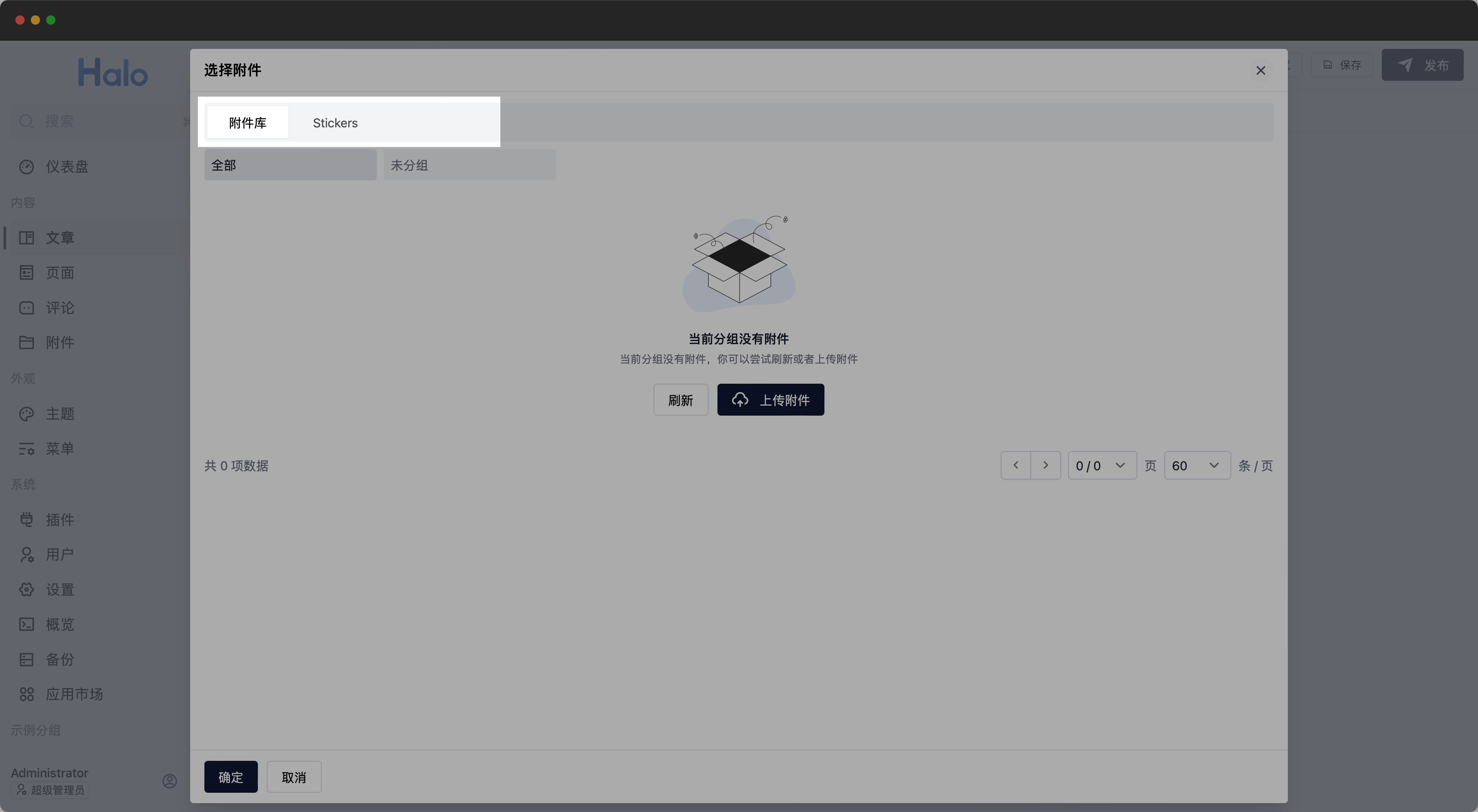
此扩展点用于扩展附件选择组件的选项卡,目前 Halo 仅包含内置的附件库,你可以通过此扩展点添加自定义的选项卡。

附件选择选项卡

定义方式

import {
  definePlugin,
  type AttachmentSelectProvider,
} from "@halo-dev/ui-shared";
import { markRaw } from "vue";
import FooComponent from "./src/FooComponent.vue";
export default definePlugin({
  extensionPoints: {
    "attachment:selector:create": ():
      AttachmentSelectProvider[] | Promise<AttachmentSelectProvider[]> => {
      return [
        {
          id: "foo",
          label: "foo",
          component: markRaw(FooComponent),
        },
      ];
    },
  },
});
AttachmentSelectProvider
export interface AttachmentSelectProvider {
  id: string; // 选项卡 ID
  label: string; // 选项卡名称
  component: Component | string; // 选项卡组件
}

其中,component 可以是组件对象或组件名称,且此组件有以下实现要求:

  1. 组件必须包含名称为 selectedprop,用于接收当前选中的附件。

    const props = withDefaults(
      defineProps<{
        selected: AttachmentLike[];
      }>(),
      {
        selected: () => [],
      },
    );
  2. 组件必须包含名称为 update:selected 的 emit 事件,用于更新选中的附件。

    const emit = defineEmits<{
      (event: "update:selected", attachments: AttachmentLike[]): void;
    }>();

AttachmentLike 是一个复合类型,可以是 Halo 附件模型数据、文件链接字符串、或者简单类型对象,类型定义:

AttachmentLike
type AttachmentLike = Attachment | AttachmentSimple | string;
interface AttachmentSimple {
  url: string; // 文件链接
  mediaType?: string; // 文件类型,如 image/png、video/*,如不填写,将被作为链接插入到文章
  alt?: string; // 代替文本
  caption?: string; // 说明文本
}

示例

为附件选择组件添加 Stickers 选项卡,用于从给定的贴纸列表选择附件。

index.ts
import {
  definePlugin,
  type AttachmentSelectProvider,
} from "@halo-dev/ui-shared";
import { markRaw } from "vue";
import StickerSelectorProvider from "./components/StickerSelectorProvider.vue";

export default definePlugin({
  components: {},
  routes: [],
  extensionPoints: {
    "attachment:selector:create": (): AttachmentSelectProvider[] => {
      return [
        {
          id: "stickers",
          label: "Stickers",
          component: markRaw(StickerSelectorProvider),
        },
      ];
    },
  },
});
StickerSelectorProvider.vue
<script lang="ts" setup>
import type { AttachmentLike, AttachmentSimple } from "@halo-dev/ui-shared";
import { ref } from "vue";

const props = withDefaults(
  defineProps<{
    selected: AttachmentLike[];
  }>(),
  {
    selected: () => [],
  },
);

const emit = defineEmits<{
  (event: "update:selected", attachments: AttachmentLike[]): void;
}>();

const stickers: AttachmentSimple[] = [
  {
    url: "https://picsum.photos/200?random=1",
    mediaType: "image/*",
  },
  {
    url: "https://picsum.photos/200?random=2",
    mediaType: "image/*",
  },
  {
    url: "https://picsum.photos/200?random=3",
    mediaType: "image/*",
  },
];

const selectedStickers = ref<Set<string>>(new Set());

const handleSelect = async (url: string) => {
  if (selectedStickers.value.has(url)) {
    selectedStickers.value.delete(url);
    return;
  }
  selectedStickers.value.add(url);
  emit("update:selected", Array.from(selectedStickers.value));
};
</script>

<template>
  <div>
    <img
      v-for="sticker in stickers"
      :src="sticker.url"
      @click="handleSelect(sticker.url)"
    />
  </div>
</template>
实现案例